Nuvio
- 4.6
- Rating
- 50.00K
- Installs
- Free
- Price

 Analysis by App-foxy
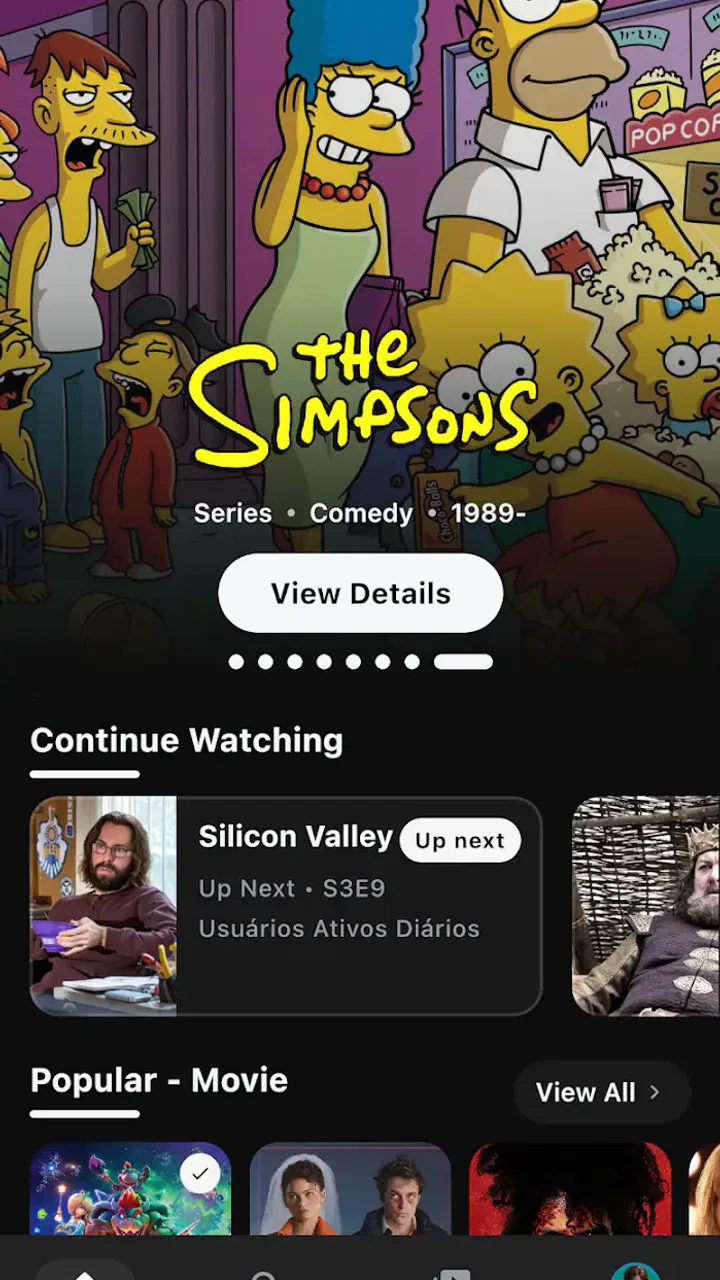
I approached Nuvio as a practical viewing companion rather than another app I would open only once. Developed by Tapframe, it sits in the video players and editors category, but its real appeal is less about editing clips and more about helping me decide what to watch, remember what caught my attention, and continue a show without losing my place. That makes it most interesting for people whose viewing habits are spread across several moments, devices, or moods.
The app is free and rated for Everyone, so the initial decision is uncomplicated: install it, explore the interface, and see whether its way of organizing movies and shows matches how you already think about entertainment. It has reached over fifty thousand installs and holds a 4.6 average from around one hundred seventy ratings, which suggests a generally positive early response without making popularity the only reason to try it. I found the more important question is whether you want a focused discovery and continuity tool, or a larger all-purpose streaming service with a broader set of built-in functions.
What I looked for before making a recommendation
When I judge an app like this, I start with the daily problem it solves. A useful catalog companion should reduce the time spent asking, “What was that title?” or “Where did I stop?” It should also make saving a film feel worthwhile instead of turning favorites into an abandoned pile. Nuvio’s store summary points directly toward those jobs: discovering movies and shows, saving favorites, and keeping watching activity in sync.
You May Also Like

 Pandora - Music & Podcasts
Pandora’s Music Is Easy to Start, but Harder to Recover
Pandora’s strength is its low-effort path from a seed to a station. Its weak spot is how much confidence it asks you to place in connection, setup, and quiet recovery.

 AccuWeather: Weather Radar
AccuWeather Review: A Quick, Clear Forecast for Everyday Decisions
For everyday plans, the best forecast is the one you can understand quickly. AccuWeather makes rain timing, radar, and local conditions easy to act on, with a few trade-offs.

 Hill Climb Racing
Why Hill Climb Racing Still Turns Crashes Into One More Run
A tiny car, a bumpy hill and one more upgrade: Hill Climb Racing keeps resurfacing because its simple chaos makes every near-miss feel personal.

 AliExpress - Shopping App
AliExpress Makes Global Shopping Feel Personal, but Shoppers Bear the Risk
AliExpress turns a global marketplace into a pocket-sized discovery engine. Its reach is useful, its shopping loop compelling, and its trade-offs easy to miss.

 Lords Mobile: Kingdom Wars
Lords Mobile Is a Kingdom-Building Routine, Not a Quick Match
A case-by-case verdict on the building, battles, device demands, and social commitments that make Lords Mobile rewarding for some players and exhausting for others.

 PDF Scanner app - TapScanner
TapScanner Makes Paperwork Easier to Capture, Check, and Share
TapScanner makes scanning with a phone feel less like a rescue operation and more like a dependable step in getting work done. Its capture tools are useful, though not flawless.
More From Our News Desk
View All News


That combination matters because these are separate habits. Discovery is about finding something new. Favorites are about preserving a decision for later. Synchronization is about continuity. I paid attention to how those ideas work together, because a discovery tool that does not help me return to a title can become little more than a browsing screen.
My second criterion was clarity. Entertainment apps can become tiring when every screen pushes recommendations, categories, or promotional material at once. For Nuvio to earn a place on my phone, I needed to understand what I was looking at quickly: whether a title was something I had saved, something I had started, or something the app was simply suggesting.
The third criterion was usefulness across real routines. I considered a short lunch break, a shared household where people watch at different times, and the common situation where I remember a movie by its general idea but not its name. An app can look polished in a brief session and still be inconvenient when used repeatedly, so I treated those small moments as the real test.
Finally, I compared its role with the usual alternatives. A streaming service is primarily where the video plays. A watchlist app is primarily where titles are stored. A general recommendation site is primarily where ideas are collected. Nuvio appears to sit between those roles. That can be a strength if you want one lightweight place to keep your viewing decisions organized, but it can also feel limited if you expect a complete replacement for a streaming subscription or a powerful media library.
Discovery feels more useful when it leads somewhere
The strongest part of the concept is the connection between browsing and remembering. I often discover a title at the wrong time: I am commuting, already watching something else, or looking for a quick choice rather than a long commitment. Saving it immediately prevents that moment of interest from disappearing. Later, the favorites area can act as a personal shortlist instead of forcing me to repeat the same search.
That is a small workflow, but it is more valuable than it sounds. I recommend saving titles with a purpose rather than treating favorites as a permanent archive. For example, I would keep one group of films for a quiet evening and another group of shows for a longer weekend session. Even without adding elaborate notes, this habit makes the saved collection easier to use because I am choosing from a relevant list rather than scrolling through every title I have ever considered.
Nuvio also makes sense for people who share recommendations informally. If a friend mentions a series while I am busy, I can use the app as a memory aid instead of relying on a message thread or a vague note. The benefit is not that it magically chooses my taste perfectly; the benefit is that it gives that recommendation a home until I am ready to evaluate it.
Keeping a viewing trail can remove everyday friction
The continuing-viewing idea is where Nuvio becomes more than a simple discovery catalog. When I watch in short sessions, the hardest part is often not finding entertainment but reconstructing my last decision. A synchronized viewing trail is useful because it preserves continuity across the times when attention is divided.
A realistic example is a weekday evening. I might watch part of a show on one device before dinner, then return later when I have only enough energy for one episode. Without a reliable place to resume, I may spend several minutes checking titles, replaying the opening, or accidentally starting the wrong installment. Nuvio’s focus on keeping watching activity in sync is designed for exactly that kind of interruption.
There is also a practical benefit for households with different schedules. One person may begin a movie while another is away, or a show may be watched in separate sessions rather than in one sitting. A shared sense of where viewing stands can reduce confusion, although I would still be careful when multiple people use the same account or device. Any continuity feature is most helpful when the viewing history clearly belongs to one person or one agreed household routine.
My tip is to treat synchronization as a continuity safeguard, not as a substitute for paying attention to the title and episode. If I am switching between several series, I still check the name before pressing play. That extra second prevents the common mistake of continuing the wrong program simply because it was the most recently active one.
Its best use is as a calm decision layer
Nuvio’s most convincing role is a calm layer between “I want to watch something” and “I have chosen a title.” That distinction separates it from apps that overwhelm me with endless options. I do not need every possible recommendation at every moment; I need a manageable set of ideas I can revisit.
This is particularly helpful for viewers who dislike making entertainment decisions repeatedly. I can browse when I have curiosity, save what seems promising, and return when I have time. The workflow changes the question from “What exists?” to “Which of my saved options fits tonight?” That is a more realistic question and usually a faster one.
The trade-off is that a personal shortlist only stays useful if I maintain it. If I save everything, the favorites area becomes another crowded catalog. I recommend removing titles after watching them or after deciding they no longer appeal. This is one of the less obvious ways to get more from the app: its organization becomes better when I use it selectively, not when I collect without limits.
Where a different kind of app may fit better
I would not present Nuvio as a universal replacement for a streaming platform. If my main priority is watching video immediately inside one service, I would choose the service that already provides the content I want. A discovery and continuity app can help me organize choices, but it does not change the availability of a particular movie or show on the platforms I use.
I would also look elsewhere if I wanted advanced media-management tools. People who maintain a large personal video library may prefer software built around local files, detailed metadata, folders, playback controls, or technical customization. Nuvio’s appeal is its straightforward viewing organization, not the promise of turning a phone into a specialist media server.
Likewise, viewers who want highly detailed tracking may find a dedicated watch-history service more suitable. Someone who records every season, episode, rewatch, rating, and personal note could outgrow a simpler favorites-and-continuation workflow. The right choice depends on whether I want a clean decision aid or a complete personal database.
There is a subtler comparison with recommendation-heavy alternatives. Some services are better when I want an algorithm to keep proposing unfamiliar titles. Nuvio makes more sense when I want to retain control over the shortlist. That means it may feel less exciting to a person who enjoys constant novelty, while it can feel more manageable to someone who is tired of browsing without committing.
What switching actually involves
Moving to Nuvio is easy if I am starting from scratch, but switching habits is a different matter. The cost is mostly organizational: I need to rebuild the list of films and shows I currently remember from notes, messages, screenshots, or several separate services. That initial cleanup can take longer than the installation itself, especially if my old watchlist contains titles I no longer recognize or want.
I recommend beginning with a small, active set rather than importing every possibility at once. I would add the titles I genuinely expect to consider soon, then use the app for a week of normal viewing. This reveals whether the favorites and continuing-viewing flow fits my routine before I invest effort in a larger catalog.
The same approach helps answer an important question: will Nuvio become the place I actually check? If I keep opening a streaming service directly and never consult the saved list, then the extra layer may not be worth maintaining. On the other hand, if I regularly lose recommendations or forget where I stopped, the habit can pay off quickly.
Another switching consideration is device continuity. Because the app emphasizes keeping watching activity in sync, I would test the handoff early rather than assuming it will match my preferred routine. Start a title, leave it, and return later in the way you normally would. That simple test is more informative than a long browsing session because it checks the feature that could become the app’s main reason for staying installed.
The minimum operating system is Android 7.0 or later, so compatibility is straightforward for many Android users with relatively recent devices. The app is free, which lowers the risk of trying it, but free does not eliminate the value of time. I would still judge it by whether it saves enough searching and remembering to justify another place in my daily media routine.
Who will get the most from it
I recommend Nuvio most strongly to casual and regular viewers who move between discovery and watching without needing a technical media-management system. It suits someone who hears about many movies, saves more than they can watch immediately, and wants a cleaner way to return to those choices. It is also a good match for viewers who watch in interrupted sessions and dislike losing track of their progress.
It can be especially useful for a person who uses several entertainment services but does not want to maintain separate mental lists. In that situation, Nuvio can serve as the planning layer: collect the titles, decide what is worth watching, and use the continuing-viewing area to keep the routine coherent. I would not expect it to eliminate every service-specific step, but it can reduce the scattered feeling that comes from remembering titles in too many places.
I would be more cautious recommending it to someone who wants one app to provide every film, show, and playback feature. The same applies to viewers who rarely save titles, always watch whatever appears immediately, or already have a tracking system they genuinely use. For them, Nuvio may add structure where none is needed.
My recommendation after using it as a decision tool
Nuvio earns a recommendation when the problem is not a lack of things to watch, but the messy process of choosing and continuing them. Its combination of discovery, favorites, and synchronized viewing gives it a clear purpose. I like that the app can turn scattered recommendations into an intentional shortlist and make interrupted viewing easier to resume.
My advice is to install it with a specific test in mind: save a few titles you actually want to remember, use the continuing-viewing flow during a normal week, and notice whether it reduces repeated searching. Keep the favorites list selective, and do not expect it to replace the streaming services or specialist media tools that serve different jobs.
Tapframe’s app is a sensible free option for people who want less browsing noise and more continuity. Its early audience response is encouraging, but the real value is personal: if your viewing life is spread across recommendations, unfinished shows, and changing schedules, Nuvio is worth trying as a lightweight viewing organizer rather than treating it as an all-in-one entertainment platform.
FAQs for Nuvio
01What is Nuvio and what does it offer?
Nuvio is a versatile app designed to enhance productivity and streamline daily tasks. It offers features like task management, calendar integration, and collaboration tools, making it ideal for both personal and professional use. Users can enjoy a seamless interface and customizable options to tailor the app to their specific needs.
02Is Nuvio available for both Android and iOS devices?
Yes, Nuvio is available for download on both Android and iOS platforms. Users can easily find it on the Google Play Store and Apple App Store. This cross-platform availability ensures that users can access their tasks and schedules on multiple devices without any compatibility issues.
03Does Nuvio require a subscription, or is it free to use?
Nuvio offers a free version with basic features, allowing users to get started without any initial cost. For those looking for advanced functionalities and additional tools, a premium subscription is available. This subscription provides enhanced features, such as advanced analytics and priority support.
04How secure is my data on Nuvio?
Nuvio prioritizes user security and employs industry-standard encryption methods to protect your data. Regular updates and security audits ensure that your information remains safe from unauthorized access. Users can also enable two-factor authentication for an added layer of security, enhancing data protection.
05Can I use Nuvio offline, and will my data sync when I reconnect?
Yes, Nuvio supports offline functionality, allowing users to access and modify their tasks without an internet connection. Once reconnected, the app automatically syncs any changes across devices, ensuring that all updates are reflected and your data remains consistent and up-to-date.
Pros
- Intuitive user interface for easy navigation.
- Seamless integration with other platforms.
- Regular updates with new features.
- Comprehensive customer support available.
- Offers a free trial for new users.
Cons
- Limited offline functionality.
- High subscription cost after trial.
- Occasional app crashes reported.
- Requires a stable internet connection.
- Customization options are limited.

Gallery